Description of the Issue
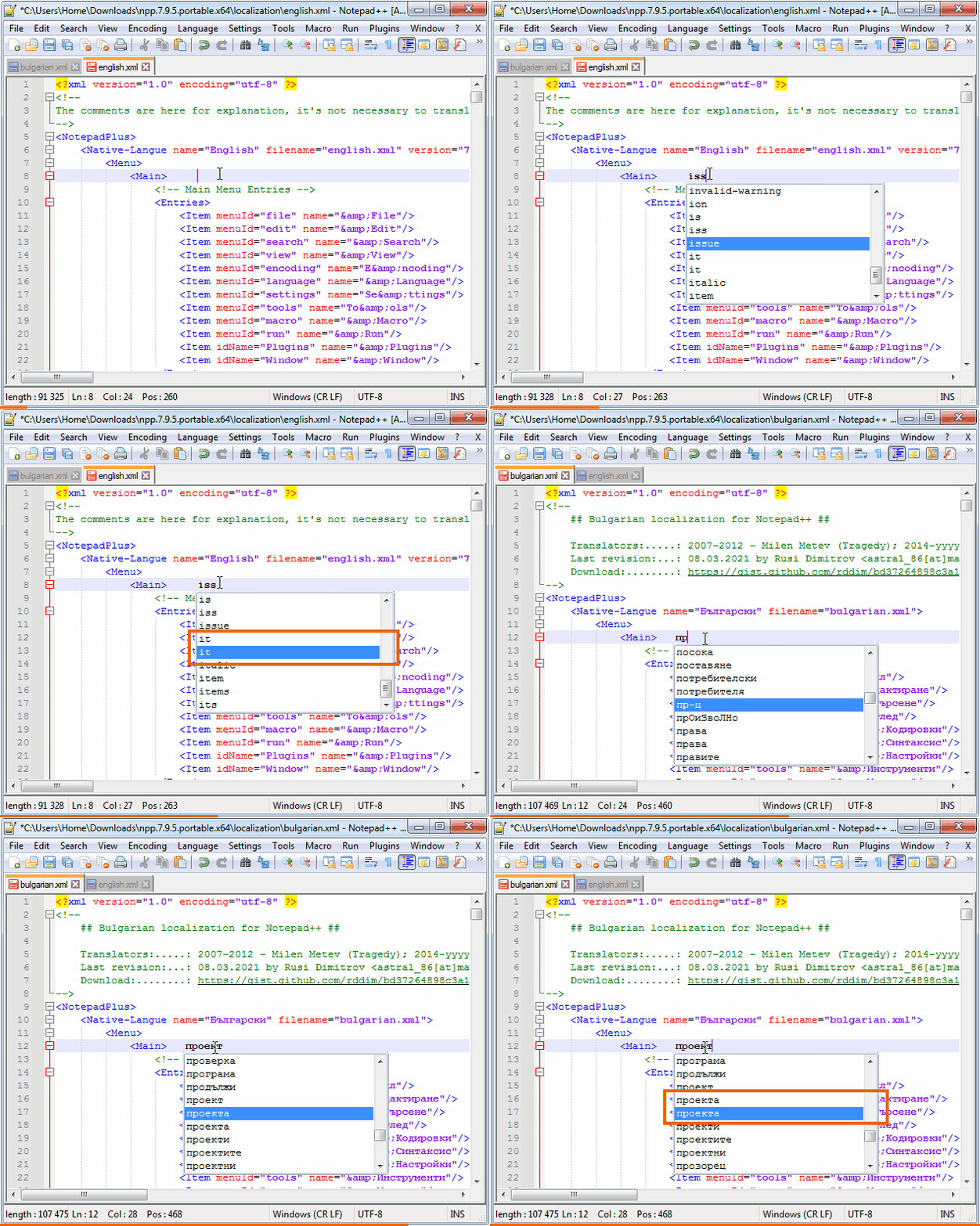
When using the Auto-Completion function some words are duplicated.
Steps to Reproduce the Issue
- Download a fresh portable version of Notepad++
- Make sure the
Word completion is selected in Settings > Preferences... > Auto-Completion
- Open the
english.xml or bulgarian.xml file from localization folder of Notepad++
- Start to type
iss or it in english.xml or прое in bulgarian.xml
Expected Behavior
I expect to see not duplicated words in the pop-up window
Actual Behavior
In the test case when type iss or it in english.xml the word it is duplicated. Same is the word them when type the. In bulgarian.xml the word проекта is duplicated when type прое. Same is the word права when type пра. I use bulgarian.xml for test the cyrillic.
Debug Information
Notepad++ v7.9.5   (64-bit)
Build time : Mar 21 2021 - 02:13:17
Path : C:\Users\Home\Downloads\npp.7.9.5.portable.x64\notepad++.exe
Admin mode : ON
Local Conf mode : ON
OS Name : Windows 7 Professional (64-bit)
OS Build : 7601.0
Current ANSI codepage : 1251
Plugins : mimeTools.dll NppConverter.dll NppExport.dll
Description of the Issue
When using the
Auto-Completionfunction some words are duplicated.Steps to Reproduce the Issue
Word completionis selected inSettings>Preferences...>Auto-Completionenglish.xmlorbulgarian.xmlfile fromlocalizationfolder of Notepad++issoritinenglish.xmlorпроеinbulgarian.xmlExpected Behavior
I expect to see not duplicated words in the pop-up window
Actual Behavior
In the test case when type
issoritinenglish.xmlthe worditis duplicated. Same is the wordthemwhen typethe. Inbulgarian.xmlthe wordпроектаis duplicated when typeпрое. Same is the wordправаwhen typeпра. I usebulgarian.xmlfor test the cyrillic.Debug Information